QR Menu Guide for Cafés and Restaurants
QR Menu systems are a modern solution that helps cafés and restaurants improve the customer experience, reduce printing costs, and simplify menu management. In this guide, you'll find everything you need to know about QR Menus.
Why Are Digital Menus Becoming More Popular?
Digital transformation is no longer limited to large restaurant chains. Today, small cafés, boutique restaurants, bakeries, hotels, and many other food and beverage businesses are adopting digital solutions to improve efficiency and customer satisfaction.
Modern customers expect instant access to menus, prices, product descriptions, and photos directly from their smartphones without waiting for a printed menu.
This is where QR Menu systems provide significant advantages. By simply scanning a QR code placed on the table, customers can instantly access the restaurant's digital menu. As a result, businesses can improve customer satisfaction while reducing operational workload.
Businesses that use digital menus not only keep up with technology but also provide a faster, more convenient, and more professional dining experience.
During busy hours, customers can browse the menu immediately without waiting for a server to hand them a printed menu, helping speed up the ordering process.
A QR Menu is a digital menu that customers can access by scanning a QR code with their smartphone camera.
No mobile application is required. Customers can instantly browse products, prices, descriptions, ingredient information, and product photos directly in their web browser.
Modern QR Menu systems offer much more than a digital version of a printed menu. They also provide restaurant owners with a powerful management panel for updating and organizing their menus.
Typical features include:
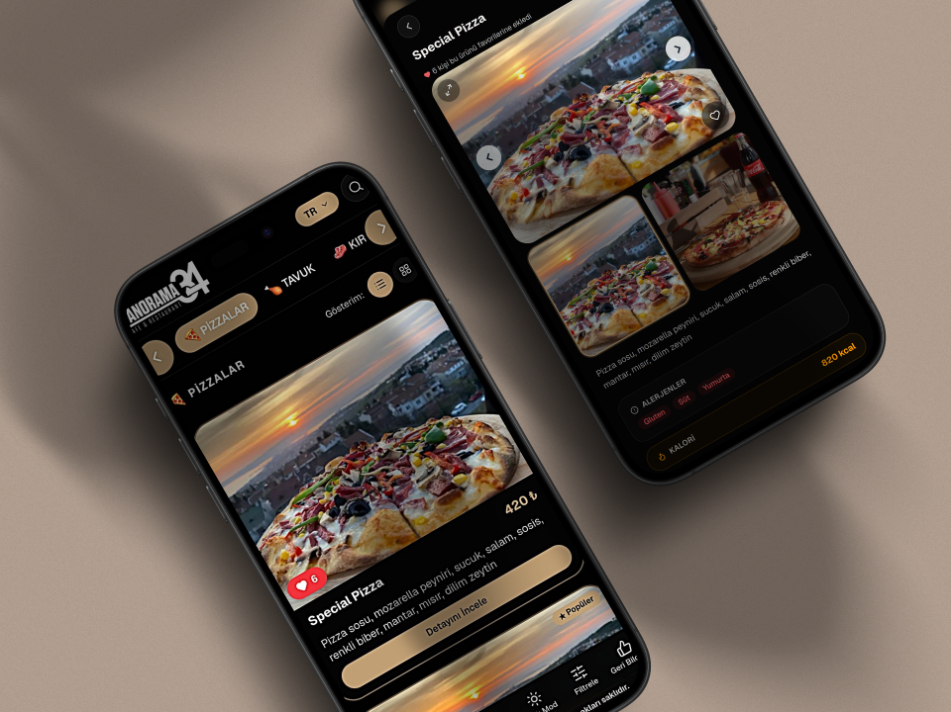
Product photos
Instant price management
Multi-language support
Allergen information
Vegan and vegetarian labels
Category management
Featured promotions
Light and dark themes
Benefits of Using a QR Menu for Cafés and Restaurants
1. Menu Updates Take Only Seconds
Updating prices on printed menus can be both time-consuming and expensive. Every price change usually requires redesigning, printing, and replacing menus throughout the restaurant.
With QR AppMenu, everything can be managed from a single dashboard.
You can easily:
Update prices
Add new products
Remove unavailable items
Edit categories
Create promotions
Temporarily hide products
All changes become visible on every QR Menu within seconds, ensuring customers always see the most up-to-date information.
2. Reduce Printing Costs
Printed menus wear out over time, become damaged, or need to be reprinted whenever prices change.
By switching to a QR Menu, businesses can significantly reduce these recurring printing expenses. This is especially beneficial for restaurants that frequently update their menus.
3. Improve the Customer Experience
Customers can access the menu instantly without waiting for a server.
High-quality product photos and detailed descriptions help guests make faster and more confident ordering decisions.
A modern, user-friendly digital menu also strengthens your restaurant's professional image.
4. Showcase Your Products More Effectively
People often choose meals based on appearance.
Professional food photography can positively influence purchasing decisions and increase sales.
With QR AppMenu, you can enrich every menu item with:
High-quality images
Detailed descriptions
Ingredient information
Product highlights
This creates a more engaging menu experience for your customers.
5. Offer Multiple Languages
For restaurants located in tourist destinations, communicating clearly with international guests is essential.
QR AppMenu supports multiple languages, allowing visitors to browse the menu in their preferred language.
This helps reduce ordering mistakes while improving customer satisfaction.
Why Choose QR AppMenu?
QR AppMenu is a user-friendly QR Menu platform designed specifically for cafés, restaurants, hotels, and other food service businesses.
Its intuitive management panel allows you to manage your entire menu without any technical knowledge. You can add new products, update prices, create promotional campaigns, organize categories, and edit your menu whenever you need.
If you're planning to switch to a QR Menu, we also recommend reading our step-by-step QR Menu migration guide.
6. Easily Share Allergen and Dietary Information
Today's customers want to know more than just the price of a meal. Many also look for ingredient details, allergen information, and dietary labels before placing an order.
This is especially important for guests with food allergies or those following specific diets such as vegan or vegetarian.
With QR AppMenu, you can add detailed information and labels to every menu item, including:
Vegan
Vegetarian
Gluten-Free
Lactose-Free
Spicy
Allergen Information
Providing this information helps customers make informed choices and reduces the risk of ordering mistakes.
7. A Modern Design Enhances Your Brand Image
First impressions matter in the hospitality industry.
A clean, attractive, and easy-to-use digital menu helps create a more professional image for your business.
QR AppMenu offers both light and dark themes, allowing you to match your menu to your restaurant's style and branding.
A modern digital menu can positively influence customers' first impressions while strengthening your brand's credibility and professionalism.
8. Currency Support for International Guests
Displaying prices in multiple currencies is a valuable feature for businesses located in tourist destinations.
QR AppMenu supports different currencies, making it easier for international visitors to understand menu prices.
This feature is particularly useful for hotels, beach clubs, cafés, and restaurants that serve foreign guests.
9. No App Download Required
Many digital ordering systems require customers to install a mobile application before viewing the menu.
QR Menus eliminate this extra step.
Customers simply open their smartphone camera, scan the QR code, and instantly access the menu through their web browser.
Because no installation is required, customers are much more likely to use the digital menu.
10. Prepare Your Business for the Future
Digital transformation is no longer optional—it has become an essential part of running a successful food and beverage business.
Restaurants that adopt QR Menus can provide faster service, simplify menu management, reduce operating costs, and deliver a more modern customer experience.
Businesses that invest in digital technology today are better positioned to stay competitive and meet evolving customer expectations.